


SmartTruckRoute Truck GPS Navi
4.11.82K Reviews
App Specs
- Version
- 2.2.101.1
- Updated On
- License
- Free
- Downloads
- 500,000+
- Developer
- SmartRouting
- Categories
- Maps & Navigation
- Platform
- Android
Screenshots
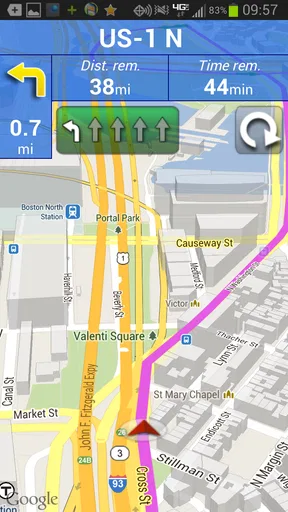
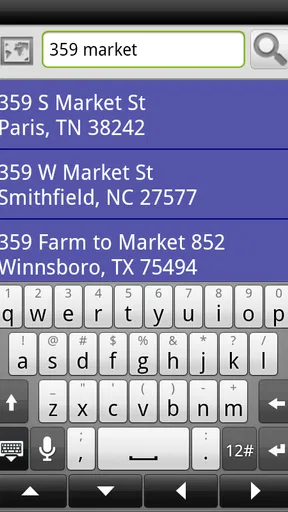
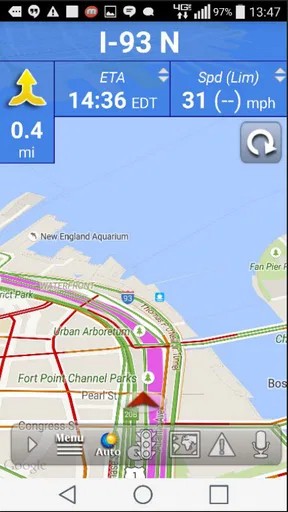
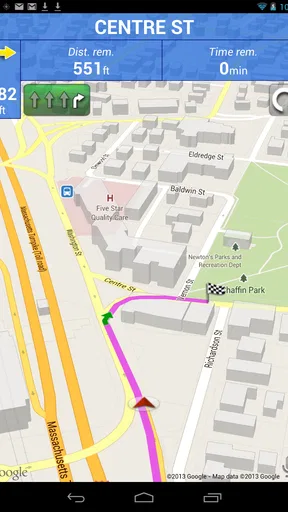
 Analysis by AppCompare
Choosing navigation for a truck is less about finding the shortest line on a map and more about avoiding a route that a vehicle cannot safely take. That is the problem SmartTruckRoute Truck GPS Navi is built around. I’d consider it when a delivery involves unfamiliar roads, bridges, or restrictions, and ordinary car directions feel like a gamble rather than a plan.
Start with the route, not the turn
Before relying on any truck navigation app, I’d gather the details that shape the journey: the vehicle’s dimensions and weight, the destination entrance, and any restrictions that matter to the load. That preparation is especially useful when a job has several stops or a receiver sits on a road that looks simple on a general-purpose map but may not suit a large vehicle.
SmartTruckRoute is a free Maps & Navigation app from SmartRouting, with optional in-app purchases priced from $19.99 to $159.99 per item. It is rated for Everyone, and its 4.1 average from around 4,200 ratings suggests that many users find it useful, while still leaving room for mixed experiences. I would treat that rating as context, not as a promise that every route will fit every truck.
Build a truck-aware trip
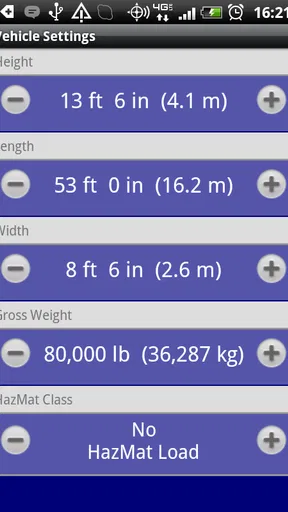
The most important practical step is entering accurate vehicle information before asking for directions. A route can only be useful if the truck profile reflects the truck that is actually on the road. If you switch vehicles, haul a different setup, or take a borrowed unit, I would check those details again rather than assuming yesterday’s route settings still apply.
That is also where this app differs from the usual free car-navigation option. A mainstream map is handy for traffic and familiar streets, but its default assumptions are for ordinary vehicles. Truck-focused routing is meant to account for low bridges and restrictions, which can matter far more than shaving a few minutes off a trip. I would use a general map as a secondary reference for context, not as the authority on whether a road suits a loaded truck.
What the drive feels like
Once a destination is set, the app’s job is to keep the route practical as the drive unfolds. Its focus on truck routes is the key benefit: avoiding a restriction before reaching it is much better than discovering the problem at a bridge or at the end of a narrow approach. Daily map updates are useful in a category where road conditions and restrictions can change, though I would still stay alert to posted signs and on-site instructions.
A realistic use case is a driver taking a new delivery across town after a long highway leg. The final few miles may include unfamiliar local roads, a low clearance, or a restricted turn that a car-focused route would not treat as a concern. I’d review the proposed approach before setting off, then follow the guidance while watching for signs and checking that the actual entrance matches the delivery instructions. That quick comparison can prevent a last-minute detour from becoming a bigger problem.
Worth Reading Before You Choose

EA SPORTS FC Mobile 26 Is a Bigger Football Game, but It Takes Time

Flipboard Shows What News Apps Must Do Beyond the Feed

Switching to Android Auto Means Rethinking Your Driving Routine

Google Calendar Makes a Crowded Week Easier to Manage

Ludo King Makes the Most of the Minutes Between Plans

Baby Panda World Brings Quick Play to Modern Phones, but Its Game Library Feels Busy
Keep a backup plan for the handoff
Navigation does not end at the destination pin. A pin can mark a building or street address without making clear which gate, loading entrance, or yard access a truck should use. I would confirm the receiving location with dispatch or the site when the approach is unfamiliar, and avoid letting any app instruction override a posted restriction or a human direction from someone managing the site.
Signal is another part of the handoff between planning and driving. The original review found that the app could struggle in rural areas with weak reception. For a long route through sparse coverage, I would check the trip before leaving, keep a separate way to identify the next major road or stop, and avoid depending on a live route adjustment at the exact moment the connection drops. That is a sensible precaution with any navigation tool, but especially important when turning around is difficult.
Useful for regular truck work, not every driver
I see the strongest case for this app with professional drivers who regularly face unfamiliar routes, bridge clearances, or vehicle restrictions. It may also help an owner-operator who wants truck-specific guidance without treating a car-navigation app as sufficient. If most of your driving is in a familiar local area and you already know which roads suit your vehicle, a dedicated truck navigator may add less value to your day.
It is also not a substitute for route planning around the details of a particular job. A shipper’s instructions, a temporary closure, a site-specific approach, or a restriction posted on the road can change what is appropriate. The useful habit is to combine the app’s route with the information from the people responsible for the load and destination, rather than expecting one screen to resolve every operational question.
Decide whether the cost fits your routine
The app is free to install, but optional purchases run from $19.99 to $159.99 per item, so I would check what an offered purchase includes before paying. A driver who depends on truck-aware navigation every week may value the specialized routing enough to consider a paid option. Someone who needs it only for an occasional unfamiliar trip should first make sure the free experience covers that particular need and decide whether the price makes sense for infrequent use.
SmartRouting’s app has been available since December 21, 2012, and its current version is 2.2.101.1. It supports Android 4.0.3 and later, which makes the stated minimum operating-system requirement fairly broad, although I would still check that the app behaves well on my own device before a demanding trip. It has passed 500,000 installs and accumulated around 1,900 written reviews, signs of an established niche product rather than a brand-new experiment.
Where I would still slow down
The main limitation is not that truck routing lacks value; it is that no digital route should be treated as physical clearance or permission to proceed. Maps can help identify likely problems, but the driver remains responsible for reading signs, assessing conditions, and following current road instructions. I would be especially cautious near construction, temporary diversions, and delivery sites whose entrances are not obvious.
There is also a trade-off in choosing a specialist tool over a familiar general map. A truck-focused app gives the trip a more relevant starting point, while a general navigator may be easier for quick local searches or checking nearby places. I would not expect either one to do every job equally well. For a truck route, I’d start with SmartTruckRoute; for a quick search or a second look at local context, I might use a familiar map alongside it.
First Impressions and Setup
Downloading SmartTruckRoute Truck GPS Navi was as smooth as a Sunday drive. It’s available for both Android and iOS, so no one’s left out in the cold. Installing it was a breeze, and the user interface is refreshingly straightforward. There’s something comforting about opening an app and not being bombarded with features you’ll never use.
Once I opened the app, it promptly asked for the usual permissions, like location access, which makes sense for a GPS app. After setting it up, you’re greeted with a clean map interface. It’s not just any map, though; it’s specifically tailored for trucks. You know you've picked the right app when it asks about your truck’s dimensions and weight before plotting your route.
Navigation Experience
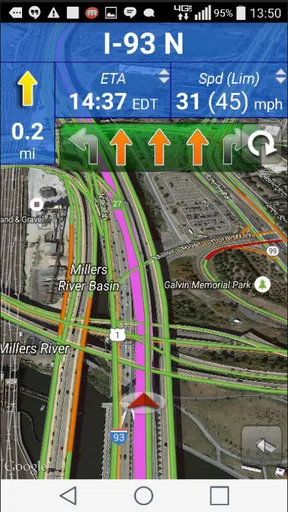
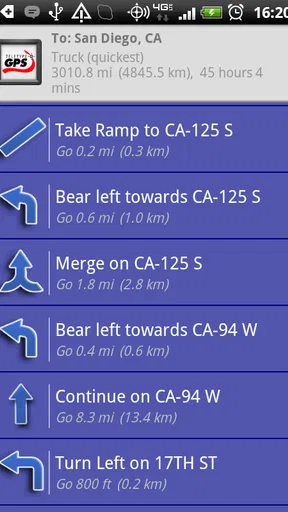
Alright, onto the main course: the navigation experience. The app boasts real-time updates, which is a lifesaver when you’re trying to avoid traffic jams or road closures. I took it for a test drive, and it did not disappoint. The app provides detailed turn-by-turn instructions, and the voice guidance is clear without being overly chatty.
What really sets this app apart is the truck-specific routing. It avoids low bridges, weight restrictions, and other hazards that could turn a pleasant drive into a logistical nightmare. It’s like having a co-pilot who knows all the truck-friendly roads by heart.
Features That Make Life Easier
Now, let’s talk features. One of the things I love is the real-time weather updates. It’s always nice to know if you’ll be driving into a storm, so you can plan accordingly. Another nifty feature is the fuel cost calculator. It estimates how much you’ll spend on gas, which is super helpful for budgeting your trip.
The app also connects with other drivers, offering a community vibe where you can share tips and get advice. It’s like a virtual truck stop where everyone’s got each other’s backs.
Room for Improvement
No app is perfect, and SmartTruckRoute Truck GPS Navi is no exception. While the app does a solid job, I did notice that it occasionally struggles in rural areas where the signal is weak. It’s not a deal-breaker, but it’s something to keep in mind if you’re planning to venture off the beaten path.
Another thing is the subscription model. While they offer a free trial, the full features are behind a paywall. It’s understandable, given the niche nature of the app, but it might not be everyone’s cup of tea.
Final Thoughts
In the world of trucking, where every minute and mile counts, SmartTruckRoute Truck GPS Navi emerges as a trusty sidekick. It’s packed with features that cater specifically to the needs of truckers, making it a standout choice for anyone behind the wheel of a big rig.
Despite some minor hiccups, the app delivers on its promise of providing safe and efficient routes. If you’re a trucker looking to make your life on the road a little easier, I’d say give this app a whirl. It might just be the co-pilot you never knew you needed.
Pros
- Real-time traffic updates enhance route efficiency.
- Voice-guided navigation keeps hands free.
- Customizable routes for truck dimensions are handy.
- Fuel cost estimation helps plan budget-friendly trips.
- Offline maps ensure navigation without data usage.
Cons
- Subscription required for full features access.
- Interface may seem cluttered for some users.
- Battery consumption can be relatively high.
- Limited language options for non-English speakers.
- Initial setup can be confusing for new users.
FAQs for SmartTruckRoute Truck GPS Navi
What features does SmartTruckRoute Truck GPS Navi offer for truck drivers?
SmartTruckRoute Truck GPS Navi provides a range of features tailored for truck drivers, including real-time truck routing, live traffic updates, and weigh station alerts. The app also offers custom routing based on the truck's size, weight, and type of cargo, ensuring compliance with road restrictions and avoiding low bridges and prohibited areas.
Is SmartTruckRoute Truck GPS Navi available for both Android and iOS devices?
Yes, SmartTruckRoute Truck GPS Navi is available for download on both Android and iOS platforms. Users can find the app on the Google Play Store for Android devices and the Apple App Store for iOS devices. This ensures compatibility with a wide range of smartphones and tablets used by truck drivers.
How does the subscription model for SmartTruckRoute Truck GPS Navi work?
SmartTruckRoute Truck GPS Navi operates on a subscription model, offering various plans to suit different needs. Users can choose daily, monthly, or yearly subscriptions, with the yearly plan providing the best value. Subscriptions include access to all features, such as real-time updates and route customization, ensuring drivers receive the most accurate information.
Can SmartTruckRoute Truck GPS Navi be used offline?
SmartTruckRoute Truck GPS Navi primarily requires an internet connection for the most accurate, real-time data. However, the app does offer offline map capabilities for areas with poor connectivity. Drivers can download specific routes in advance, ensuring they have access to navigation even in remote locations with limited signal.
How accurate are the real-time updates provided by SmartTruckRoute Truck GPS Navi?
The app uses up-to-date traffic data and user-generated reports to provide accurate real-time updates. This includes information on traffic congestion, road closures, and weather conditions. By leveraging a large network of users and multiple data sources, SmartTruckRoute ensures that drivers receive timely information to adjust routes and avoid delays effectively.


